


PRO1 Connect
4.3289.00 Reviews
App Specs
- Version
- 2.2.1+2996
- Updated On
- License
- Free
- Downloads
- 50,000+
- Developer
- PRO1 IAQ
- Categories
- House & Home
- Platform
- Android
Screenshots
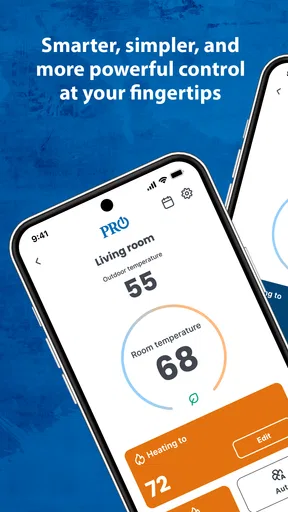
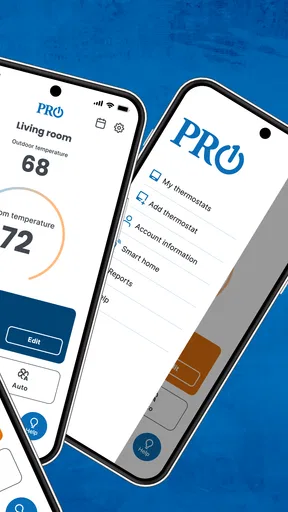
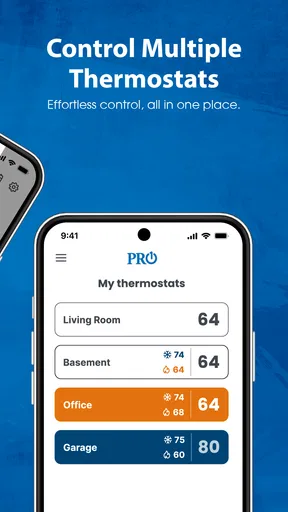
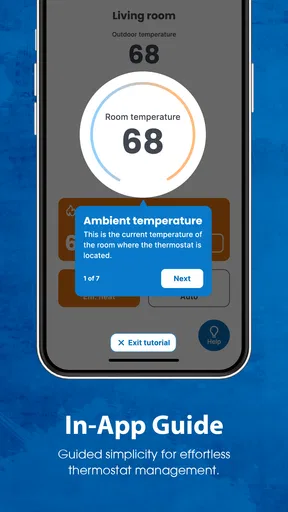
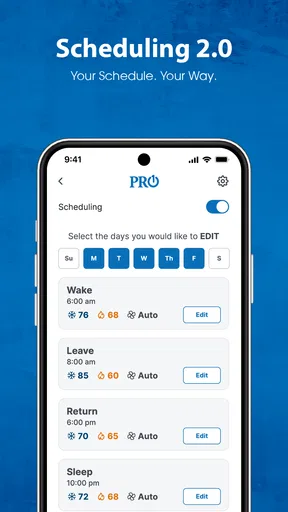
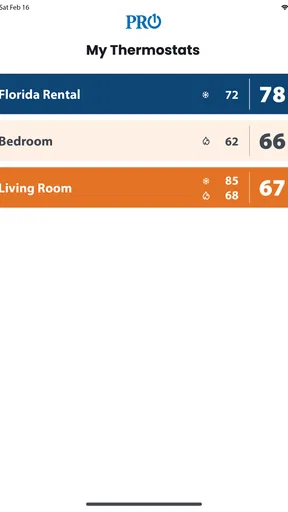
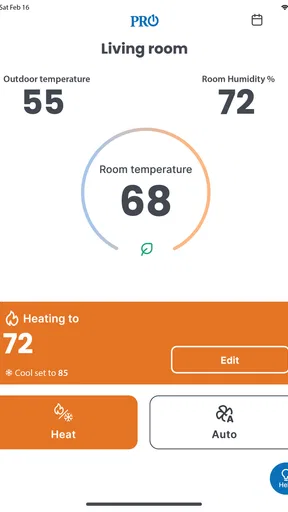
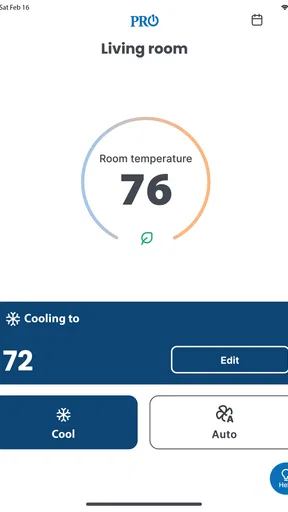
 Analysis by AppCompare
If you are trying to decide whether a thermostat app is worth adding to your phone, the first question is not whether it looks polished. It is whether it works with the thermostat already installed in your home. PRO1 Connect is built for that specific job: setting up and controlling a compatible PRO1 thermostat from a mobile device. I found it most useful as a practical remote control rather than as a broad smart-home platform, and that distinction matters when you compare it with more general heating and home-automation apps.
The app comes from PRO1 IAQ and sits in the House & Home category. It is free to install, available to Everyone, and has reached over fifty thousand installs. Its average score is 4.3 from more than five hundred ratings, with over two hundred reviews. Those figures suggest that it has found a real audience among PRO1 thermostat owners, but they should not be read as a reason to install it if your equipment is from another brand. Compatibility is the decision that comes before every other consideration.
What to check before choosing PRO1 Connect
Before choosing this app, I’d think about how often I genuinely want to adjust the thermostat while away from home, rather than treating phone control as a benefit by itself. I’d also consider who else needs access and whether a direct, dedicated controller suits the household better than a single dashboard for several kinds of devices. Those practical checks make the next question clearer: what keeps it useful once the initial setup is no longer new?
Compatibility comes before convenience
My first recommendation is simple: identify the thermostat model in your home before downloading anything. This is not a universal temperature controller that can be judged independently of the hardware. Its purpose is tied to compatible PRO1 equipment, so the app makes sense when you already have that ecosystem or are moving into a home where it is installed.
That makes the choice different from selecting a general smart-home app. With a broad platform, you may begin by comparing supported brands, voice assistants, automation routines, and connected devices. Here, the relevant question is narrower: can this app communicate with the PRO1 thermostat you need to manage? If the answer is yes, its focused design can be an advantage. If the answer is no, a different app is the practical choice regardless of how appealing the interface might be.
Think about the control you actually need
I would also decide whether you want basic remote adjustment or a larger home-automation experience. A dedicated thermostat companion is usually attractive to someone who wants to check the temperature, change a setting, or prepare the house before returning. It is less compelling for someone who wants one central dashboard for lighting, security, appliances, and heating from several manufacturers.
This distinction prevents a common disappointment. A focused app can be easier to understand because it does not ask you to organize an entire connected home around it. At the same time, it may feel limited beside a platform designed to combine many brands and devices. PRO1 Connect should therefore be evaluated as a thermostat companion, not as a replacement for every home-control tool.
Worth Reading Before You Choose

EA SPORTS FC Mobile 26 Is a Bigger Football Game, but It Takes Time

Flipboard Shows What News Apps Must Do Beyond the Feed

Switching to Android Auto Means Rethinking Your Driving Routine

Google Calendar Makes a Crowded Week Easier to Manage

Ludo King Makes the Most of the Minutes Between Plans

Baby Panda World Brings Quick Play to Modern Phones, but Its Game Library Feels Busy
Older phones are not automatically excluded
The listed minimum operating system is Android 7.0, which gives the app a useful level of reach for people who keep an older phone in service. That can be particularly helpful when a household uses an inexpensive spare device as a home controller. I would still keep the operating system updated where possible, but the requirement does not force every user onto a recent handset.
The current release is version 2.2.1+2996. I see that information as useful when troubleshooting: if the app behaves differently from instructions you have received, checking the installed version is a sensible first step before assuming the thermostat or network is at fault. It is a small detail, but it saves time when several people in a household use different phones.
Separate thermostat problems from phone problems
One of the most useful habits with a connected thermostat is to diagnose in layers. If the app cannot control the system, first check whether the thermostat itself is displaying normally. Then check the phone’s connection and whether the app is signed into the expected account or setup. Finally, test the physical thermostat. This order helps you avoid repeatedly changing settings in the app when the real issue is the home network or the HVAC equipment.
I would also make the initial setup while standing near the thermostat and with enough time to test a change. Doing it during a rushed departure makes it difficult to know whether the device was paired correctly or whether a command simply took time to register. Once the connection is working, try one modest adjustment and confirm it at the thermostat. That confirmation is more valuable than assuming a button press completed the whole process.
Who benefits most from a dedicated controller?
PRO1 Connect is a natural fit for renters or homeowners who inherited a compatible PRO1 thermostat and want phone access without replacing the hardware. It can also suit households where one person manages the temperature remotely while another person is at home. For a family, having a phone-based option may reduce the need to walk to the thermostat every time someone wants a small adjustment.
It is also useful for people whose routines change during the day. If you leave earlier than usual, return sooner, or want to prepare the home before arriving, remote access can be more convenient than waiting until you are indoors. The benefit is not that the app transforms heating into a complicated automation project; it is that a familiar control is available where you already keep your phone.
Where PRO1 Connect earns its place
For me, its lasting value would come from fitting naturally into a few recurring moments, such as a changed schedule or a quick adjustment before heading home. I’d judge it by whether those occasions save enough effort to justify keeping another app in my routine, while still relying on the thermostat itself when that is simpler. That distinction leads to a closer look at the habits and upkeep that can make a focused controller worthwhile over time.
A focused experience can be easier to live with
In my experience, the strongest argument for this app is focus. It is not trying to make the thermostat one tile among dozens of unrelated devices. That narrow purpose can make everyday actions feel more direct, especially for someone who does not want to learn a large smart-home system.
This matters for less technical users. A household member may not want to understand hubs, scenes, integrations, or device groups just to adjust heating. A dedicated PRO1 companion gives the task a clear context. The app is most successful when you treat it as the mobile extension of an existing thermostat rather than as a technology project.
A realistic morning and evening routine
Imagine leaving home on a mild morning and realizing halfway to work that the thermostat is still set for your normal routine. With a compatible setup, a phone controller gives you a chance to make the adjustment without turning around. Later, before heading home, you can check the setting again rather than arriving to a house that has been conditioned for an empty schedule.
That scenario sounds ordinary, but ordinary is exactly where this kind of app has value. The convenience comes from removing a small interruption, not from adding another screen to your life. I would judge the app by how reliably it handles these occasional corrections, not by whether it offers an impressive collection of controls that I would rarely use.
Useful for shared responsibility
Temperature control often becomes a household negotiation. One person may be home during the day, while another handles the evening routine or pays attention to energy use. A phone-based thermostat controller can make the device accessible to the person who is responsible at that moment, instead of making control depend on who happens to be standing beside the wall unit.
There is a trade-off, though. More people with access can mean more accidental changes or disagreements about the preferred setting. I recommend agreeing on a simple household rule before everyone starts using the app: decide who makes routine adjustments and what to do when someone wants a temporary change. The app can provide access, but it cannot resolve that human part of temperature control.
Setup is part of the ownership experience
The initial connection deserves more attention than a quick download-and-tap approach. Have the thermostat available, know which phone will be used for the first setup, and avoid changing several household settings at once. If you are helping a relative, write down the basic steps in plain language after the connection works. That small handoff can be more valuable than explaining every screen.
I also suggest testing the app from the place where you will normally use it. If your main purpose is adjusting the home before returning, test that use case rather than only checking it while standing beside the thermostat. A successful setup at home does not automatically tell you how convenient the app will be during your real routine.
The main limitations I noticed
The biggest limitation is its dependence on compatible PRO1 hardware. This is not a flaw in the narrow sense, but it sharply limits who should choose it. If your thermostat is unsupported, the app cannot become useful through persistence or repeated setup attempts. You need a different route, such as the manufacturer’s own companion app for your equipment or a broader platform that explicitly supports it.
The second limitation is scope. Someone looking for advanced whole-home scenes, a single control panel for mixed brands, or a deeply integrated smart-home system may find a dedicated thermostat app too narrow. I would not select PRO1 Connect solely because it is free; I would select it because its focused job matches the hardware and the way I want to control it.
There is also a practical dependence on connectivity. Remote control is only valuable when the thermostat, phone, and connection between them are functioning as expected. If you need guaranteed local control during a connection problem, keep using the physical thermostat as the fallback. A phone app should add convenience, not become the only way you know how to operate the heating system.
How it compares with the usual alternatives
The closest alternative is often the thermostat itself. For a person who changes the temperature only when already at home, the wall control may be faster and more dependable than reaching for a phone. In that situation, PRO1 Connect is an optional convenience rather than an essential tool.
A manufacturer-specific app for another thermostat brand is the better alternative when your hardware is not PRO1. It will be designed around that equipment, while this app’s focused approach will not help you cross brand boundaries. Choosing the correct ecosystem is more important than comparing visual design.
General smart-home platforms become more attractive when your priority is consolidation. If you already manage several compatible devices from one place, adding heating to that same environment may reduce app switching. The compromise is that broader platforms can involve more setup and may present thermostat controls in a less direct way. For a single compatible PRO1 thermostat, the dedicated option may be simpler; for a mixed connected home, a broader solution may fit better.
What switching really costs
Moving to PRO1 Connect is inexpensive in the obvious sense because the app is free. The real cost is time and attention: identifying the thermostat, completing setup, learning the control flow, and explaining access to anyone else in the home. If the existing physical thermostat already meets your needs, that effort may not produce enough benefit.
Switching away from it has a similar hidden cost. You may need to learn another interface, reconnect the equipment, and rebuild the routine that made remote control useful. I would avoid changing systems simply because another app has more features on paper. First decide whether those features solve a real problem in your home. A smaller, familiar controller can be the better long-term choice when your requirements are modest.
For people moving into a home with PRO1 equipment, the decision is easier. You are not necessarily replacing anything; you are adding a mobile way to interact with what is already installed. In that case, the setup effort is easier to justify, especially if remote access or shared household control would remove daily friction.
Questions worth answering before installation
One question is whether the app replaces the thermostat. I would treat it as an additional control method, not a reason to ignore the physical unit. Keep the thermostat usable and make sure everyone in the home knows how to operate it directly.
Another question is whether it is suitable for every PRO1 thermostat. The important wording is “compatible.” Check the specific equipment rather than assuming that the PRO1 name alone guarantees support. This is the step most likely to save you from an unsuccessful setup.
You may also wonder whether it is appropriate for children. The app is rated Everyone, but that does not mean every household should give every family member unrestricted control. Temperature changes affect comfort and potentially energy use, so access should follow your household’s practical rules.
Finally, ask whether you need it if you rarely adjust the temperature. My answer would be no, not necessarily. If you spend most of your time at home and the wall thermostat is convenient, the app may remain unused. Its value rises when your schedule changes, when you manage the home from elsewhere, or when several people need a convenient way to make adjustments.
My recommendation
I recommend PRO1 Connect to anyone who owns a compatible PRO1 thermostat and wants straightforward mobile access without building a complete smart-home system. The free price and modest Android requirement make it easy to try, while its focused purpose keeps the decision relatively simple. Before installing, confirm the thermostat model and plan a calm setup session rather than treating the connection as an afterthought.
I would skip it if your thermostat is from another manufacturer, if you want one app for a large mixed-device home, or if remote temperature control does not solve a real inconvenience. In those cases, the manufacturer’s matching app or a broader home platform is likely to be a better fit. The best reason to choose this app is not the feature list; it is the match between a compatible PRO1 thermostat and a genuine need for convenient remote control.
Overall, I see PRO1 Connect as a sensible, specialized House & Home app. It does not need to be more ambitious to be useful. When the hardware match is right, it can turn occasional thermostat adjustments into a quick phone task. When the match is wrong, no amount of convenience can overcome that basic limitation. That makes it easy to recommend selectively, and that is exactly how I think it should be chosen.
Pros
- Easy way to manage compatible PRO1 thermostats remotely.
- Clear controls make temperature adjustments quick and convenient.
- Useful for checking home temperature while away.
- Can help improve comfort through scheduled heating control.
- Designed for straightforward everyday use on supported devices.
Cons
- Requires a compatible PRO1 thermostat to provide meaningful functionality.
- App features may vary depending on the thermostat model.
- Remote control depends on a stable internet connection.
- Initial setup may require patience when pairing the thermostat.
- Limited usefulness for users without PRO1 connected equipment.
FAQs for PRO1 Connect
What is PRO1 Connect, and what is it used for?
PRO1 Connect is a companion app designed to let users control and monitor compatible PRO1 smart thermostats from a mobile device. After connecting the thermostat to Wi-Fi, the app can typically be used to adjust the temperature, change heating or cooling modes, review schedules, and manage settings remotely. Its usefulness depends on having a supported PRO1 thermostat and a stable internet connection.
Which devices and thermostats are compatible with PRO1 Connect?
Compatibility depends on the specific PRO1 thermostat model and its connected-home features. Not every PRO1 thermostat can be controlled through the app, so it is important to check the model number, product documentation, or the compatibility information shown in the app store listing before downloading. You will also need a compatible Android or iOS device and a wireless network that supports the thermostat’s setup requirements.
How do I connect my PRO1 thermostat to the app?
To get started, install PRO1 Connect, create or sign in to an account if required, and follow the in-app instructions for adding a thermostat. You may need to place the thermostat in pairing or Wi-Fi setup mode, select your home network, and enter its password. Keep your phone near the thermostat during setup, and confirm that Bluetooth, local-network access, and location permissions are enabled when requested.
Can I control my home temperature remotely with PRO1 Connect?
When the thermostat is successfully connected to Wi-Fi and the app service is available, PRO1 Connect can generally allow remote temperature adjustments and mode changes from outside the home. You may also be able to manage programmed schedules and view current thermostat information. Remote control will not work if the thermostat is offline, the home internet connection is down, or the app account cannot reach the device.
Is PRO1 Connect free, and what should I know about privacy or permissions?
PRO1 Connect is generally available to download without an upfront app purchase, although using it requires a compatible PRO1 connected thermostat. During installation and everyday use, the app may request permissions related to notifications, Bluetooth, local-network access, location, or account information to support setup and device communication. Review the current store listing and privacy policy before installing, especially if household usage data is a concern.


